Gradient Weather
- 4.4
- Rating
- 10.00K
- Installs
- Free
- Price

 Analysis by App-foxy
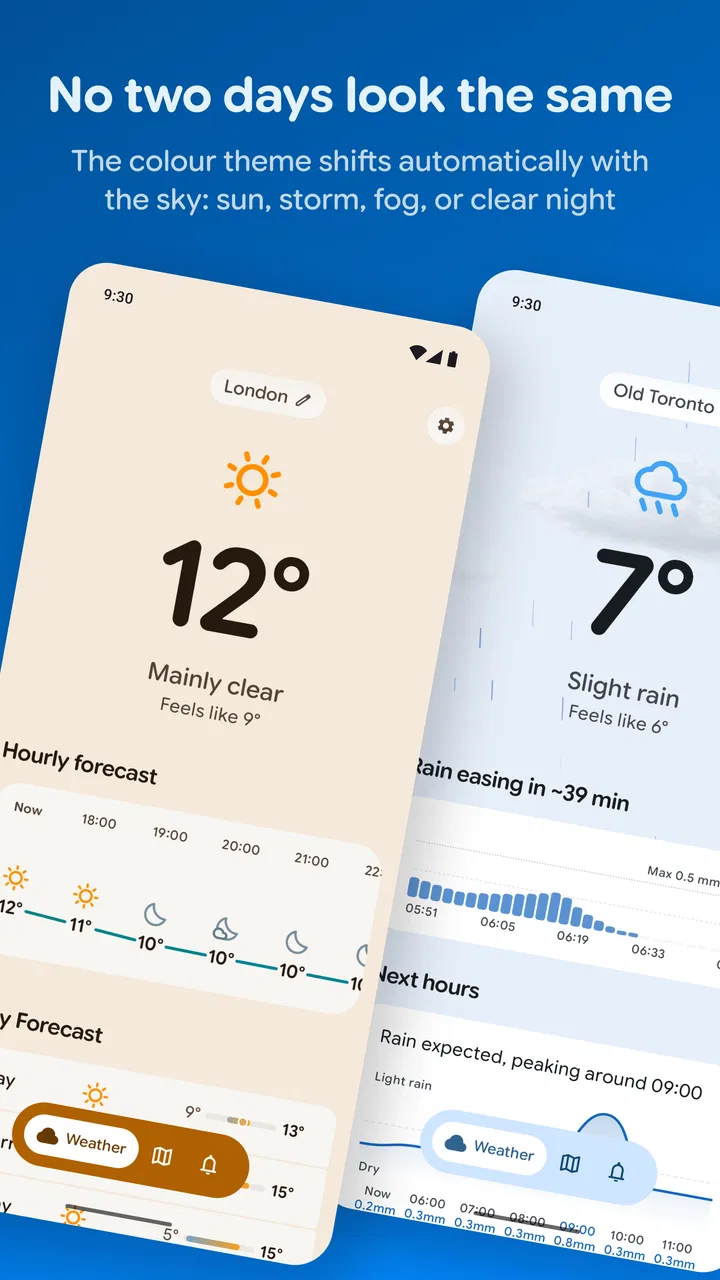
I like weather apps that respect the fact that checking the forecast is usually a very small part of my day. I do not want to navigate through a crowded dashboard just to decide whether I need a jacket, and I do not want a dramatic interface to distract me from the one thing I am trying to understand: what the conditions mean for my next few hours. Gradient Weather, from subtle signals, takes a more personal approach. It is a free weather app built around Material You styling, custom themes, and weather alerts, with a visual identity that feels more considered than the usual default utility.
After using it as the kind of app I would open before leaving home, planning a walk, or checking whether outdoor chores make sense, I found its main appeal easy to understand. It makes weather feel like part of the phone rather than a separate billboard full of advertisements and competing panels. That simplicity is useful, but it also means this is not automatically the best choice for someone who needs a highly technical forecast, extensive mapping, or a full planning toolkit.
How Gradient Weather fits into a shared household
A weather app can become a surprisingly shared tool. One person checks the morning conditions before taking children to school, another looks before commuting, and someone else wants to know whether laundry or gardening can happen later. In that setting, the visual side of Gradient Weather matters because a clear, calm screen is easier to understand at a glance than a page packed with warnings, promotional cards, and unrelated details.
You May Also Like

 Blood Strike: 2.5 Anniversary
Blood Strike’s Loadouts Turn Every Drop Into a Tactical Gamble
A close look at Blood Strike’s custom loadouts: how fast access to signature weapons reshapes its battle royale rhythm, rewards preparation, and narrows the gap between fights.

 Pandora - Music & Podcasts
Pandora’s Music Is Easy to Start, but Harder to Recover
Pandora’s strength is its low-effort path from a seed to a station. Its weak spot is how much confidence it asks you to place in connection, setup, and quiet recovery.

 8 Ball Pool
 Is Built on Rivalries, Rematches, and Routine
A close look at the rivalries, rematches, shared routines, and unanswered safety questions that turn a quick pool match into a persistent mobile community.

 Samsung Music
’s Quiet Strength Is Playing What You Already Own
Its reach comes less from spectacle than from dependable access to a personal library. That simplicity is both the app’s strongest retention engine and its ceiling.

 AccuWeather: Weather Radar
AccuWeather Review: A Quick, Clear Forecast for Everyday Decisions
For everyday plans, the best forecast is the one you can understand quickly. AccuWeather makes rain timing, radar, and local conditions easy to act on, with a few trade-offs.

 Hill Climb Racing
Why Hill Climb Racing Still Turns Crashes Into One More Run
A tiny car, a bumpy hill and one more upgrade: Hill Climb Racing keeps resurfacing because its simple chaos makes every near-miss feel personal.
More From Our News Desk
View All News


I can imagine using it on a household phone or a tablet left in a common room, where different people only need a quick answer. The custom theme approach gives the app a more personal feel, while Material You helps it sit naturally alongside other Android interface elements. That is a practical benefit rather than mere decoration: when the colors and layout feel familiar, a quick glance can become faster and less mentally demanding.
The important distinction is that this is still an individual weather app, not a household coordination system. I would not treat it as a shared calendar, a family alert hub, or a replacement for direct communication. If one person sees a storm alert, that does not automatically mean everyone else has seen it. My preferred household workflow would be simple: each regular user checks the forecast on their own device, then shares important decisions in the family chat or in person.
That boundary prevents a common mistake. A beautifully designed weather screen can make information feel more authoritative than it really is. I would still verify important travel or outdoor plans through the forecast details available in the app and use common sense when conditions are changing quickly. For everyday choices, it is convenient. For safety-critical decisions, it should be one source of information rather than the entire plan.
A realistic morning routine
Imagine a weekday morning when one adult is preparing breakfast, a child is looking for a school jacket, and another household member is deciding whether to cycle. I would open Gradient Weather first for the broad picture, then look at the upcoming conditions rather than relying only on the current visual. If rain appears likely during the cycling window, that person can adjust the plan while there is still time. The app is helpful here because its presentation encourages a quick, direct check instead of making the user dig through unrelated content.
For a shared routine, I would keep the theme readable and avoid choosing a style simply because it looks striking. A high-contrast, familiar appearance is more useful when someone is tired, rushing, or checking from across a room. This is one of the less obvious trade-offs of customization: the most attractive theme is not always the fastest one to interpret.
Setting it up without confusing personal preferences
Gradient Weather is free to start using, which makes it easy to try without turning the first setup into a purchasing decision. The app is rated for Everyone, so its general presentation is suitable for a broad household audience. That does not mean every family member will want the same view. Adults may care about alerts and planning, while younger users may only want to know whether it is warm, cold, wet, or clear.
I would set it up separately for each regular user instead of trying to create one universal household configuration. Weather preferences are personal: one person may value a quiet visual overview, while another wants alerts enabled and checks conditions several times a day. Keeping those habits separate avoids the awkward situation where one user changes the appearance or notification behavior for everybody else.
There is also a useful account-boundary question. I would not assume that a shared device creates shared history, shared preferences, or a family profile. If several people use the same phone, they should agree on whose location and alert choices are active before relying on the display. A weather app can show information for the wrong place if the household treats one device as a neutral public screen without checking its current setup.
That is not a reason to avoid the app; it is a reason to establish a small routine. The person who changes locations or alert settings should mention it to the others, especially if the device is used by people with different commutes. On a personal phone, this is barely an issue. On a shared device, it becomes part of responsible setup.
Making the visual design work for more than one person
The custom themes deserve a practical test rather than a purely aesthetic one. I would choose a style that keeps the important weather information visually distinct from the background. Gradients can be attractive, but subtle color transitions may be less useful for someone with limited color perception or for anyone viewing the phone in strong sunlight. If a household member struggles to read the display, a simpler theme is the better choice even if it looks less fashionable.
Material You integration is also most valuable when it supports recognition. When the weather app feels consistent with the rest of the phone, users can identify it quickly and understand where they are in the interface. I would avoid changing themes often on a shared device, because consistency helps occasional users. Personal experimentation is fine on an individual phone; a communal screen benefits from stability.
One practical tip is to test the selected theme at different times of day. A design that looks clear in a dim room may become difficult to scan outdoors, while a bright palette may be comfortable in daylight but tiring at night. This is a small adjustment, yet it can determine whether a household member actually uses the app or simply asks someone else for the forecast.
Alerts and coordination: useful, but not a substitute for conversation
Weather alerts are one of the features that can make a weather app more than a passive display. I appreciate the idea of receiving a timely prompt instead of remembering to check manually, especially when plans involve commuting, outdoor work, or a school run. At the same time, alerts need to be treated as personal notifications. If only one person has the app configured on a shared phone, the rest of the household may never know that an alert appeared.
My recommendation would be to let each adult decide which alerts fit their own routine, then use a simple household agreement for anything important. For example, if someone receives a warning before an outdoor event, they can tell the others directly rather than assuming that the notification has already coordinated everyone. This approach keeps the app useful without assigning it a role it was not designed to fill.
Alerts can also create unnecessary friction if they are enabled without thinking about context. A person who works outdoors may want more immediate awareness, while someone who checks the forecast only once in the morning may prefer a quieter experience. The right balance depends on the user. I would start conservatively, observe whether the notifications help, and adjust rather than allowing every possible alert to interrupt the day.
Another non-obvious use is coordinating temporary plans without turning the app into a permanent household rule. Before a picnic, sports practice, or a long drive, each person can check the same general forecast and agree on a backup plan. Gradient Weather is useful as the common reference point, but the actual coordination still belongs in a message or conversation. That division of labor keeps expectations clear.
Where a conventional weather app may be better
The usual alternatives often win when the user needs a dense forecast, radar-style visualizations, specialist measurements, or a large ecosystem of location and travel tools. Gradient Weather’s strength is its focused, personal presentation. If I wanted to monitor a complicated trip, compare several places in detail, or study changing conditions minute by minute, I would choose a more information-heavy service.
That comparison is not a criticism of the design. It is a question of purpose. A household that mainly needs a pleasant, readable answer to “what should we expect today?” may prefer this app. A household with a boater, outdoor worker, serious photographer, or frequent traveler may need more depth than a style-led weather experience is intended to provide.
I also would not install it solely because a family member likes colorful interfaces. The real test is whether the app makes checking weather easier. If the themes encourage people to open it and review conditions, they have practical value. If customization becomes a distraction from the forecast, the default or a simpler alternative may be preferable.
Age, trust, and responsible use
The Everyone content rating makes Gradient Weather approachable for a household with different ages. A younger user can understand the basic purpose without encountering a mature entertainment layer, and an older relative may appreciate a straightforward weather screen over a complicated dashboard. Still, age suitability is not the same as independent judgment. Children should not be expected to interpret serious weather situations alone simply because they can open the app.
I would teach younger users a simple rule: use the app to notice conditions, then ask an adult when the weather affects safety or a change of plans. That is especially important for alerts. A notification can prompt a conversation, but it should not be treated as a complete explanation of what to do.
Trust also depends on location awareness. In a household, people may travel between home, school, work, and relatives’ houses. Before acting on what the screen shows, I would check that the selected place is the one relevant to the plan. This sounds obvious, but it is exactly the kind of small mistake that happens when several people share one device or when someone borrows another person’s phone.
For privacy-minded households, the sensible approach is to review the app’s location behavior and notification choices during setup, then give each person control over their own device where possible. I would not hand a shared phone to a child and assume that its existing settings reflect the child’s needs. Clear ownership of settings is more trustworthy than a vague assumption that everyone sees the same thing.
The developer, subtle signals, has positioned the app around a distinctive visual experience rather than a broad household-management promise. That helps set expectations. I see it as a weather companion that can support family routines, not as a parental-control product or a formal emergency communication channel.
Value, optional spending, and long-term use
The app is free, which lowers the barrier for trying it on one personal phone before introducing it into a shared routine. There are in-app purchases ranging from $3.49 to $54.99 per item, so I would be careful about assuming that every customization or enhanced option is included at no cost. A household should decide in advance whether the free experience is sufficient and avoid treating optional spending as necessary for basic weather checking.
This matters more on shared devices, where one person may explore customization while another assumes the app has no paid elements. I would make the purchase boundary clear, especially if the phone is used by younger family members. The Everyone rating describes the content audience; it does not mean every household should ignore its normal rules for purchases.
The app has an average rating of 4.4 from around 654 ratings, and it has passed 10 thousand installs. Those figures suggest that it has found an audience, but I would not use popularity as a substitute for fit. A smaller weather app can still be the right choice if its interface matches the way you check conditions. Conversely, a well-liked design may disappoint someone who expects professional forecasting tools.
Gradient Weather was released on April 28, 2026, so I would approach it as a relatively new option rather than a long-established household standard. That does not make it unsuitable, but it does encourage a little patience. I would use it alongside the household’s existing routine at first, particularly if alerts affect travel or outdoor plans, and see whether everyone finds the information clear and dependable in daily use.
Three habits that make the app more useful
First, I would separate visual preference from forecast importance. Choose a theme for comfortable reading, then judge the app by how quickly you can find the information needed for a real decision. This prevents the attractive gradient from becoming the main reason to keep using it.
Second, I would create a two-step alert habit. Let the relevant person receive the notification, then share the practical consequence with anyone affected. “The plan may need to move indoors” is more useful to a household than silently assuming that everyone saw the same alert.
Third, I would assign responsibility for shared-device settings. One person can check the active location and notification choices when the device is used communally, while everyone else knows whom to ask if the display seems wrong. This is a simple way to avoid stale settings without inventing a family account structure that the app does not promise.
A fourth habit is worth adding for households with changing schedules: check the forecast at the moment a decision is made, not only at breakfast. A morning glance may be enough for clothing, but an afternoon outdoor plan deserves a fresh look. This is not about opening the app constantly; it is about matching the check to the consequence of being wrong.
My household verdict
I recommend Gradient Weather to people who want a weather app that feels personal, calm, and visually connected to their Android phone. Its Material You styling and custom themes make it more pleasant than a generic forecast screen, while weather alerts give it a useful role in everyday planning. For a household, it works best as a shared reference that starts conversations about plans rather than as an automatic family coordinator.
I would choose it for a couple who want quick morning checks, a shared tablet in a kitchen, or a family that prefers a clean interface over a technical weather workstation. I would also consider it for an older relative who finds crowded weather apps tiring, provided the chosen theme remains easy to read. The free entry point makes testing straightforward, and the Everyone rating keeps the app broadly approachable.
I would skip it, or pair it with another service, if your household depends on advanced weather analysis, extensive map views, or highly specialized planning information. I would also avoid making it the only source for serious safety decisions. Its value is in making ordinary weather checking more comfortable and more likely to happen, not in replacing every other form of preparation.
In my experience, the best way to use it is to keep the setup personal, the shared-device boundaries clear, and the alerts connected to real conversations. Gradient Weather is at its best when its attractive design reduces friction without pretending to manage the household for you. That makes it a thoughtful free weather choice for everyday routines, especially when readability and atmosphere matter as much as raw information.
FAQs for Gradient Weather
01What is Gradient Weather, and what does it offer?
Gradient Weather is a weather application focused on presenting forecasts in a visually polished and easy-to-read format. After exploring its main screens, users can typically view current conditions, temperature, precipitation information, wind details, and forecasts for upcoming hours or days. Its design may appeal to people who prefer a modern weather experience rather than a basic, text-heavy forecast tool.
02Does Gradient Weather require location access to work?
Gradient Weather can generally provide weather information without continuous location access if you manually search for and save a city. However, enabling location permission makes it more convenient because the app can automatically display conditions for your current area. Before accepting access, review the permission options offered by your device, since you may be able to choose approximate location or allow access only while using the application.
03How accurate are the forecasts in Gradient Weather?
Forecast accuracy in Gradient Weather depends on the meteorological data provider, your location, and rapidly changing local conditions. Like other weather apps, it should be treated as a helpful guide rather than a guarantee, especially for severe weather, outdoor activities, or travel decisions. It is worth comparing important alerts with official local weather services and keeping notifications enabled when available.
04Is Gradient Weather free to download and use?
Gradient Weather may be available as a free download, although the exact features, advertising, subscriptions, or optional in-app purchases can vary between Android and iOS versions. Before installing, check the application store listing for current pricing and subscription details. Pay particular attention to recurring billing information if premium tools, ad removal, widgets, extended forecasts, or additional customization options are offered.
05Does Gradient Weather support widgets, notifications, or multiple locations?
Support for widgets, weather notifications, and multiple saved locations depends on the version of Gradient Weather installed and the operating system being used. These features can be especially useful for checking conditions without opening the app or monitoring cities for work and travel. After installation, review the settings and device permissions to confirm which options are available and configure alerts according to your preferences.
Pros
- Clean
- attractive interface with easy-to-read weather information.
- Provides quick access to current conditions and upcoming forecasts.
- Useful visual presentation makes weather changes easy to understand.
- Supports convenient weather checking without complicated menus.
- Helpful for planning daily activities and checking local conditions.
Cons
- Some advanced forecast details may require a premium subscription.
- Forecast accuracy can vary depending on location and weather data sources.
- The app may use noticeable battery or data when updating frequently.
- Advertising may interrupt the experience for users on the free version.
- Limited customization may not satisfy users wanting detailed weather controls.

Gradient Weather
Gallery